The effect builder
The effect builder gives a Compendium entry its mechanics: what it does to the numbers and dice on a character sheet. Open it with Mechanics on your entry’s page.
The one rule
Section titled “The one rule”Mechanics automate only a character’s own numbers and which dice to roll. They never play the game for you.
- Model: bonuses, AC, speeds, proficiencies, resistances, senses, advantage, uses, attack and save numbers, damage dice.
- Don’t model: effects on other creatures (an ally’s bonus from your aura), or rules that decide outcomes (“no damage on a successful save”). Put those in a note block or leave them in the entry’s text.
- Features are trackers and switches, never “use” buttons. Rage is a resource (its uses) plus a toggle (Raging) that turns its bonuses on.
The screen
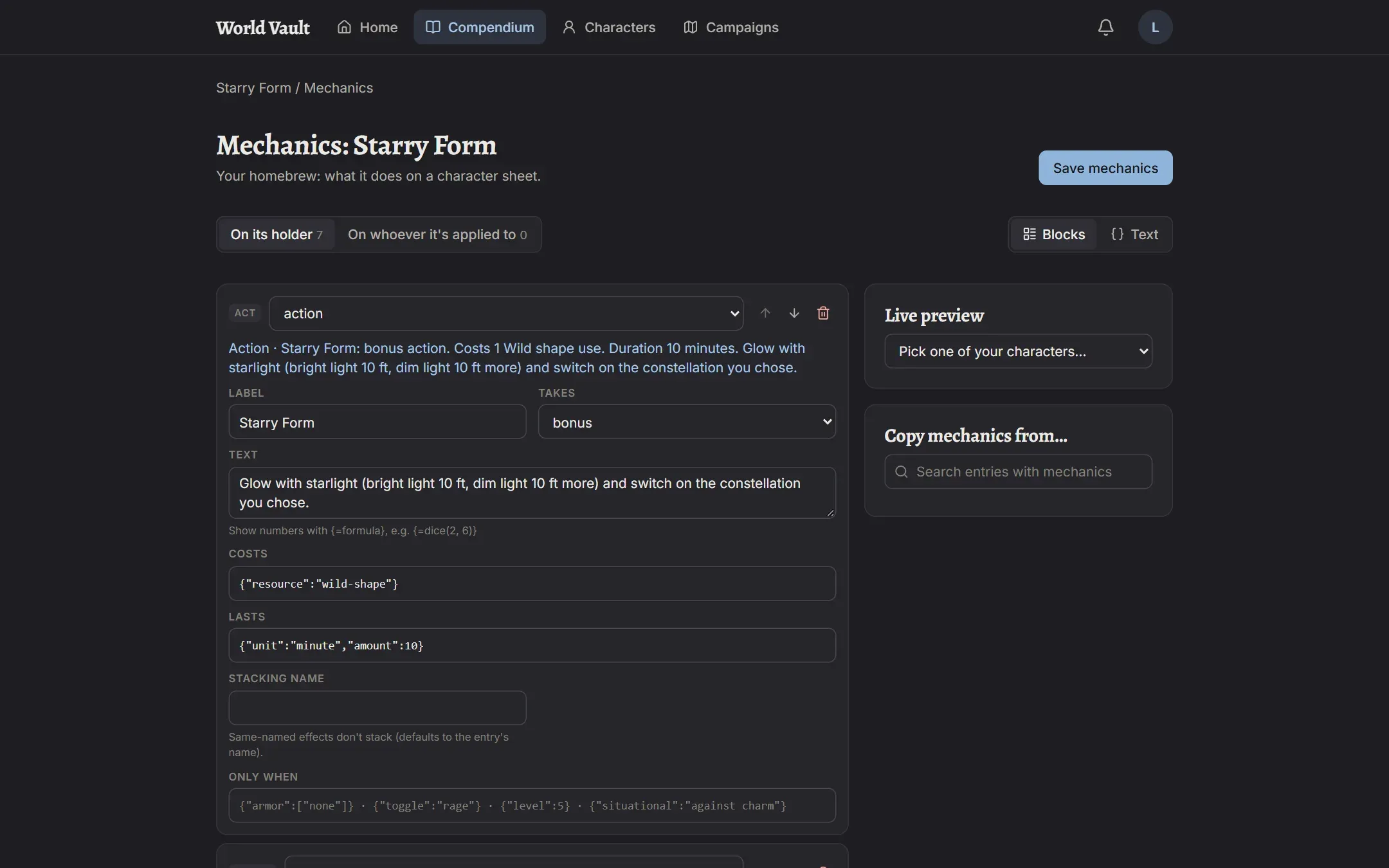
Section titled “The screen”- On its holder / On whoever it’s applied to (tabs). The first is what the entry does for the character who has it (a feature, a worn item). The second is what it does to whoever it’s applied to: a potion someone drinks, or a spell the DM applies (Bless, Haste). Most entries only need the first.
- Blocks / Text. Blocks is the form view; Text is the raw list, for copying and pasting. Switching keeps your work.
- Block cards. Each block shows its group (Modify, Grant, Act, Choose, Text), a type picker, move and delete buttons, and a blue line saying what it does in plain English. Read that line: if it says what you meant, the block is right.
- + Add a block adds an empty block. Presets add ready-made blocks for common cases.
- Live preview. Pick one of your characters to see exactly what your draft changes on their sheet (“AC: 17 → 18”, new actions, uses, senses). A ⚠ line means a block has a problem on that character.
- Copy mechanics from… adds another entry’s blocks to yours, to adjust.
Choose Save mechanics when you’re done. Every block and formula is checked first; problems are listed and nothing is saved until they’re fixed. Players whose characters use the entry are told it changed.
Fields every block has
Section titled “Fields every block has”- Stacking name. Two effects with the same name don’t stack; the best counts. It defaults to the entry’s name, so two copies of an item don’t double up.
- Only when. Conditions for the block (below). Empty means always.
Block types
Section titled “Block types”Modify
Section titled “Modify”- ac-base: a way to work out base AC; the best one wins, and shields and bonuses add on top. Example:
10 + @dex.mod + @con.mod. - bonus: adds to a number. Bonus to is one of
ac,initiative,speed,hp-max,spell-dc,spell-attack,passive-perception,attacks-per-action(Extra Attack is 1),carry-size,attack,damage,save.<ability or all>,check.<ability or all>,skill.<skill>. Amount is a formula (dice for damage, e.g.1d6). Damage type labels extra damage. Which attacks limits attack and damage bonuses (below). - score: changes an ability score: Add, At least (a minimum, e.g. 19), or a higher Maximum. Only when building the character applies it once in the builder (species and background increases).
- speed: a walking, flying, swimming, climbing or burrowing speed; the best of each counts. A limit caps a speed instead (Grappled: walk limit 0).
- proficiency: a skill, save, armor, weapon, tool, language or check. Skills and saves use short names (
stealth,dex); the rest use names as shown (Light Armor,Longsword,Thieves' Tools). Levels: proficient, expertise, half, half rounded up. - sense: for example Darkvision, with a range in feet.
- defense: resistance, immunity, vulnerability, or condition immunity, to a damage type or condition.
- roll-mode: advantage or disadvantage on a roll (
save.wis,skill.stealth,attack,initiative…). With Only when → situational it’s a reminder only, never pre-selected. - resource: a pool of uses with tick boxes on the sheet: an Id other blocks refer to, a Label, Uses (a formula), when it comes back (short rest, long rest, dawn), and optionally how many come back on a short rest.
- toggle: an on/off switch on the sheet. Blocks with Only when → toggle: id apply only while it’s on. Requires says when it can be on; if that stops being true, the sheet says so but never flips it.
- spell: gives a spell by its Compendium name in lowercase with dashes (
misty-step): known, prepared (always prepared), or free (casts without a slot, with Free casts and when they come back). - spellcasting (classes and subclasses): progression (full, half, third, pact), rounding, the ability, and prepared spells as a formula when the class table has no column for it.
- feat: a feat that comes with the entry.
Act: cards with numbers, rolled by the player
Section titled “Act: cards with numbers, rolled by the player”- attack: an attack card. Kind melee, ranged or spell; Ability str, dex,
finesse(the better of the two) orspell. To-hit is worked out unless you fill To hit. Damage rows of dice and type;@attack.modinside damage is the attack’s ability modifier. Costs a resource:{"resource":"rage"}. - save: a saving-throw card: which save, DC (empty means your spell save DC), damage rows, Half on a success, area and range.
- heal: healing or temporary hit points, as a formula.
- action: a card with words, for anything else (Action Surge). The text can show live numbers with
{=formula}, for example{=dice(@class.rogue.sneak_attack_dice_count, 6)} extra damage, and those dice are tappable.
Choose: asked in the builder, at level-up or on the sheet
Section titled “Choose: asked in the builder, at level-up or on the sheet”- choose: an Id, a Prompt, How many, From (below), and At level. Other blocks can use the answer with
choice:<id>as their value (for example a defense ofchoice:ancestry).
- note: a reminder on the sheet that never changes a number. Use it for anything outside the one rule.
Only when
Section titled “Only when”Type conditions in the Only when box (or a toggle’s Requires). Combine several: {"armor":["none"],"shield":false}.
{"equipped":true}/{"attuned":true}: items, only while equipped or attuned.{"armor":["none","light"]}: the armor being worn.{"shield":false}: no shield (ortrue: needs one).{"toggle":"rage"}: while that switch is on.{"level":5}: character level 5 or higher.{"classLevel":{"class":"fighter","level":11}}: 11 or more fighter levels.{"startingClass":true}: only for the class the character started with.{"below":{"str":15}}: while Strength is below 15.{"situational":"against being charmed"}: a reminder only.
Formulas
Section titled “Formulas”Anywhere a field is shown in monospace you can type a number, dice or a formula. A wrong formula turns red with the reason; variable chips appear below a focused field to insert.
Pieces: numbers, dice (2d6), + - * /, brackets, and:
min(a, b),max(a, b),floor(x),ceil(x): for examplemax(1, @cha.mod).scale(@level, 1: 1d10, 5: 2d10, 11: 3d10, 17: 4d10): the value at the highest step not above the first value.per_slot(1d6): 1d6 for each slot level above the spell’s own (upcasting).dice(count, size): dice with a worked-out count or size.
Variables: @level, @pb (proficiency bonus), @str.mod … @cha.mod, @str.score … @cha.score, @class.<class>.level, @class.<class>.<table column> (for example @class.barbarian.rage_damage_bonus), @spell.mod, @spell.attack, @spell.dc, @attack.mod, @slot, @hp.max, @speed.
Which attacks
Section titled “Which attacks”For attack and damage bonuses, and advantage on attacks. Every field you set must match:
"range": ["melee"]or["ranged"]"madeWith": ["weapon", "unarmed", "spell", "natural"]"ability": ["str"]"property": ["finesse", "heavy", "light", "thrown", "two-handed", "versatile", "reach"]"category": ["simple"]or["martial"]"weapon": ["longsword"]"thisItem": true: only attacks made with this item (a +1 sword).
Example, Rage damage: Bonus to damage, Amount @class.barbarian.rage_damage_bonus, Which attacks {"ability":["str"]}, Only when {"toggle":"rage"}.
Choices: the From box
Section titled “Choices: the From box”{"kind":"skill"}any skill, or{"kind":"skill","from":["insight","perception"]}; add"expertise":truefor expertise.{"kind":"language"}·{"kind":"tool","from":["Smith's Tools","Mason's Tools"]}·{"kind":"ability","from":["str","dex"]}{"kind":"damage-type","from":["fire","cold"]}{"kind":"option","from":["a","b"],"labels":["First","Second"]}: named options, used withchoice:<id>.{"kind":"subtrait","from":["slug-a","slug-b"]}: pick one of an entry’s sub-options; only the chosen one applies.{"kind":"feat"},{"kind":"subclass"},{"kind":"asi-or-feat"},{"kind":"ability-increase","from":["int","wis","cha"]}.
Worked examples
Section titled “Worked examples”A ring: +1 to AC and saves while attuned. Two bonus blocks, ac = 1 and save.all = 1, each with Only when {"attuned":true}.
A +1 weapon that adds 1d6 cold. Bonus attack = 1 and bonus damage = 1, both with Which attacks {"thisItem":true}; and bonus damage = 1d6, Damage type cold, Which attacks {"thisItem":true}.
Rage. resource rage (uses @class.barbarian.rage_count, long rest) · toggle rage · action “Rage” (bonus action, costs {"resource":"rage"}) · the damage bonus above · advantage on check.str and save.str while raging · resistance to bludgeoning, piercing and slashing while raging.
A potion of fire resistance. On whoever it’s applied to: a defense, resistance to fire.
Bless (applied by the DM). On whoever it’s applied to: bonus attack = 1d4, bonus save.all = 1d4.
Checking your work
Section titled “Checking your work”- Read each block’s blue line.
- Use the Live preview with a character that has the entry, and one that doesn’t.
- Save, then open the character’s sheet and tap the numbers to roll and check the dice.
Need a hand?
Section titled “Need a hand?”If you’re not sure how to build the mechanics for an entry, ask for help with an enhancement request. Open Requests & bugs from your account menu and choose Suggest an idea. In it:
- Describe what the entry should do on a character sheet, such as which numbers it changes, when it applies, and any choices or limited uses.
- Paste a link to the entry that needs its mechanics configured. Open the entry in the Compendium and copy the address from your browser’s address bar.
Others can upvote it too, so if someone has already asked for help with the same entry, upvote theirs instead.