Finding rules
The Compendium holds the rules: the free D&D rules for both 2014 and 2024 (the System Reference Documents), plus homebrew written by people on World Vault.
Searching
Section titled “Searching”Type in the search box on Home or the Compendium page. Narrow results with the filters:
- Type: spells, monsters, classes, subclasses, species, backgrounds, feats, equipment, magic items, rules and more.
- Ruleset: 2014 or 2024.
- Type-specific filters, such as spell level, a class’s spell list, or an equipment category.
- Used in my campaign: only what’s switched on in one of your campaigns.
Entries with the same name in both rulesets are grouped into one row; open it to pick the version.
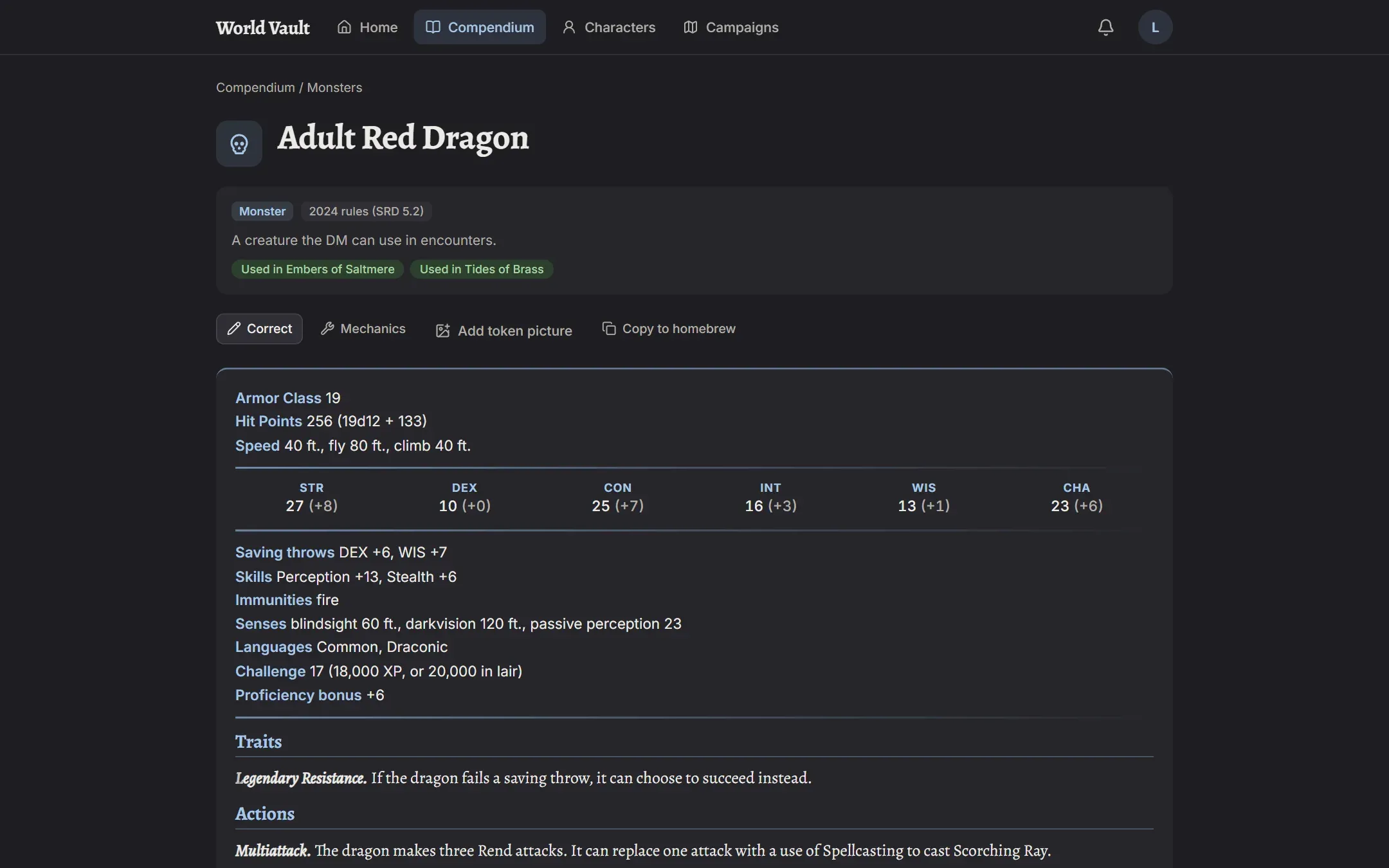
Reading an entry
Section titled “Reading an entry”An entry opens with an at-a-glance card: which ruleset it belongs to, how it applies, and which of your campaigns use it. Below that is the full text, and for monsters, the stat block.
Used In lists your campaigns with a switch for each, so a DM can allow or rule out the entry in their campaign. See Settings and campaigns.
Quick lookup on your sheet
Section titled “Quick lookup on your sheet”On a character sheet, the magnifying glass searches the rules without leaving the sheet, and tapping a feature or spell opens its entry.
Recently viewed
Section titled “Recently viewed”Your Home page lists the entries you’ve opened recently.